HTML Links
Links are the defining feature of the web because they allow you to move from one web page to another — enabling the very idea of browsing or surfing.
You will commonly come across the following types of links:
- Links from one website to another
- Links from one page to another on the same website
- Links from one part of a web page to another part of the same page
- Links that open in a new browser window
- Links that start up your email program and address a new
email to someone
Writing Links
Links are created using the <a> element. Users can click on anything between the opening <a> tag and the closing </a> tag. You specify which page you want to link to using the href attribute.
you can read about links in javascript read this Book Chapter 4: Ch.4 “Links” (pp.74-93) .
HTML Layouts
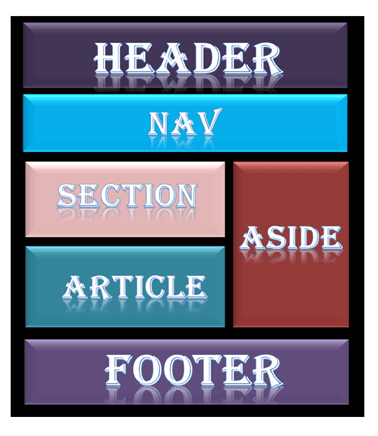
HTML layouts provide a way to arrange web pages in well-mannered, well-structured, and in responsive form or we can say that HTML layout specifies a way in which the web pages can be arranged. Web-page layout works with arrangement of visual elements of an HTML document.
Web page layout is the most important part to keep in mind while creating a website so that our website can appear professional with the great look. You can also use CSS and JAVASCRIPT based frameworks for creating layouts for responsive and dynamic website designing.
Every website has a specific layout to display content in a specific manner.
Following are different HTML5 elements which are used to define the different parts of a webpage.
-
<header>: It is used to define a header for a document or a section.
-
<nav>: It is used to define a container for navigation links
-
<section>: It is used to define a section in a document
-
<article>: It is used to define an independent self-contained article
-
<aside>: It is used to define content aside from the content (like a sidebar)
-
<footer>: It is used to define a footer for a document or a section
-
<details>: It is used to define additional details
-
<summary>: It is used to define a heading for the
-
<details> element
to know more about layout read this article or you can read throw tis book Chapter 15: “Layout” (pp.358-404) .
WHAT IS A FUNCTION?
Functions let you group a series of statements together to perform a specific task. If different parts of a script repeat the same task, you can reuse the function (rather than repeating the same set of statements).
-
A JavaScript function is a block of code designed to perform a particular task.
-
A JavaScript function is executed when “something” invokes it (calls it).
JavaScript Function Syntax
A JavaScript function is defined with the function keyword, followed by a name, followed by parentheses ().
Function names can contain letters, digits, underscores, and dollar signs (same rules as variables).
The parentheses may include parameter names separated by commas: (parameter1, parameter2, …)
The code to be executed, by the function, is placed inside curly brackets: {}
EXAMPLE
function name(parameter1, parameter2, parameter3) { // code to be executed }
-
Function parameters are listed inside the parentheses () in the function definition.
-
Function arguments are the values received by the function when it is invoked.
Inside the function, the arguments (the parameters) behave as local variables.
A Function is much the same as a Procedure or a Subroutine, in other programming languages.
to know more about the functions red in this book